Shopify redirects for large catalogs: find every old URL, map it, bulk import it
How Shopify URL redirects work, where a big catalog's old URLs hide, and how to map and bulk import thousands of 301s with no chains or homepage dumps.
- Written by
- Profitonium team
- Published
- Reading time
- 7 min
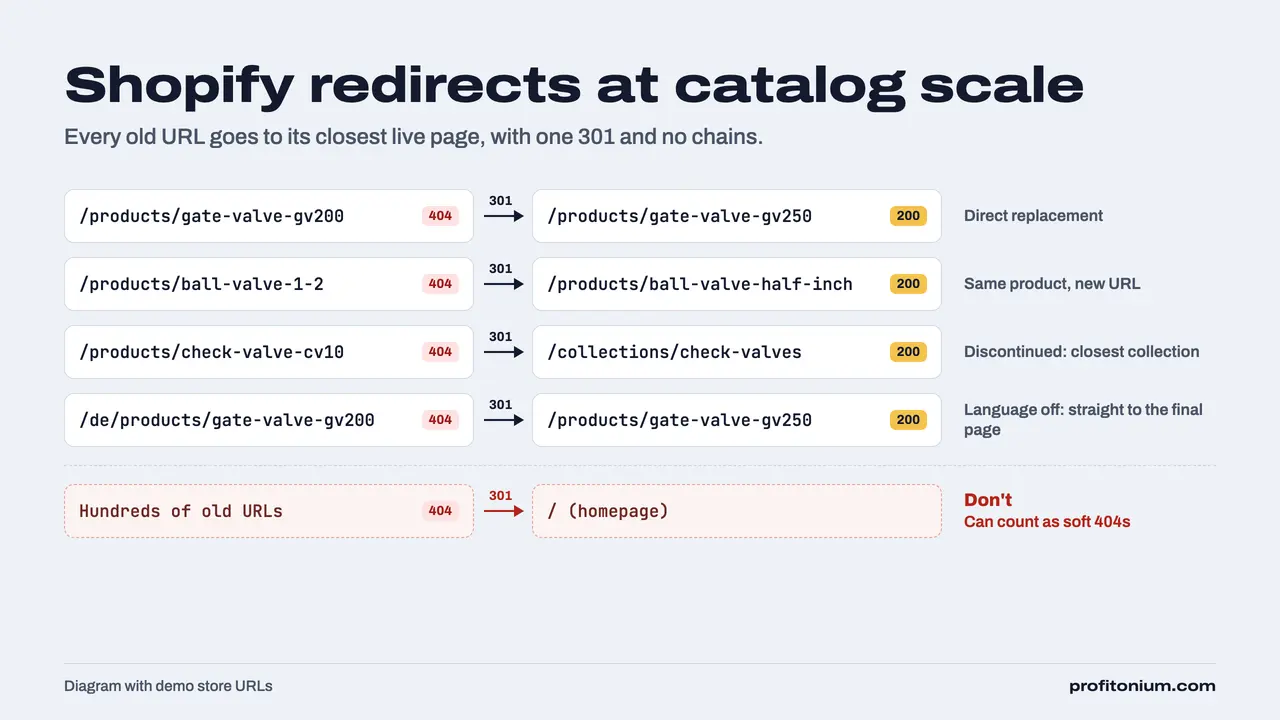
A Shopify redirect sends visitors and Google from an old address that shows "Page not found" to a live page, with a permanent 301. You can add redirects one at a time or in bulk with a CSV file under Content › Menus › URL redirects. On a catalog with thousands of products the import is the easy part. The work is the map: finding every old URL that still gets visits or links, and sending each one to the closest live page, never the homepage.
We used the method below to import 9,000+ redirects in one job for a parts distributor with 4,000+ products (case study). The examples in this guide use a demo store, not that client's URLs.
How Shopify redirects work
The rules come from Shopify's URL redirects help page, plus what we saw on a live store:
- They only work on broken URLs. Shopify's words: "You can redirect only from broken URLs." If the old address still loads a page, the redirect does nothing. To redirect a product, it has to be gone from the online store first, for example archived or deleted.
- They're permanent. A Shopify redirect answers with a 301, which we confirmed on a live store. For a permanent redirect, Google shows the new page in search results (Google's redirects guide).
- They start working immediately, with no publish step.
- There's a cap: 100,000 redirects per store, or 20,000,000 on Shopify Plus.
- Some paths can't be redirected, such as
/cart,/orders,/apps,/collections/alland the bare/productsand/collectionspaths. - Query strings are unreliable. Shopify warns that URLs with query strings "might not work as expected", so map the clean path.
When you change the URL handle of a page or a collection, Shopify offers to create a URL redirect from the old address. Make sure it's ticked before you save, or the old address starts showing Page not found.
Why big Shopify stores pile up dead URLs
On large catalogs the same few habits leave old addresses behind:
- Products archived and listed again. The new listing gets a new URL, and the old one shows Page not found to everyone who saved it, linked to it or still finds it in Google.
- Discontinued and replaced parts. The old part's page goes, but buyers and distributors keep linking to it.
- A language or market switched off. Every translated copy of every page, such as
/de/products/..., starts returning 404 on the same day. - Handle edits without the redirect box ticked, and old URLs from the platform the store came from.
- Broken-link apps that "fix" every 404 by sending it to the homepage or All products. The error report goes quiet, but the visitor still lands on the wrong page.
Where to find the old URLs
No single report lists them all. We combine:
- Search Console: the "Not found (404)" reason in Indexing › Pages, and the top pages in the Performance report. The examples list is limited to 1,000 rows, so treat it as a sample.
- The store's own redirects: export them from URL redirects › Export. You'll check their targets too.
- Visitor 404s: any app or analytics tool that records the paths real visitors hit.
- Backlinks: a backlink tool's "best by links" report, filtered to pages that return 404. These carry the most link value.
- Old sitemaps and exports from before a migration, a handle clean-up or a language change.
Put them in one list of paths, such as /products/gate-valve-gv200, and remove duplicates.
Check every old URL before you map it
Request each path without following redirects and record what it returns. This loop does it from a terminal, one request a second:
while read -r old; do
  curl -s -o /dev/null -w "%{http_code}\t%{redirect_url}\t$old\n" "https://yourstore.com$old"
  sleep 1
done < old-paths.txt > status.tsv
Keep it slow. At about one request a second, our check of roughly a thousand old paths ran without errors. A later storefront check got 429 Too Many Requests, and we stopped and waited.
| What comes back | What it means | What to do |
|---|---|---|
| 200 | The page still loads | Leave it. Shopify won't redirect a live URL |
| 404 | Dead | Redirect it to the closest live page |
| 301 to the right page | Already fixed | Leave it |
301 to / or /collections/all |
Dumped | Replace it with a specific target |
| 301 to a page that redirects again | A chain | Point it straight at the final page |
On the parts store, many of the dead URLs we found already had a redirect, but it sent them to All products or the homepage. Those count as broken too.
Where each old URL should point
Pick the first target that fits:
- The same product under its new URL, or its direct replacement.
- The same article or page, if it moved.
- The most specific collection the product belonged to, when it's discontinued and has no replacement.
- Nothing. If no page is relevant, leave the 404.
Don't send old URLs to the homepage in bulk. Google's site move guide says not to redirect many old URLs "to one irrelevant single URL destination, such as the home page", because it "might be treated as a soft 404 error". It also says to redirect "to the final destination directly", even though Googlebot follows up to 10 hops.
Here's a map for a demo store:
| Redirect from (demo store) | Redirect to | Why |
|---|---|---|
| /products/brass-ball-valve-1-2 | /products/brass-ball-valve-half-inch | Same part, new URL |
| /products/gate-valve-gv200 | /products/gate-valve-gv250 | Direct replacement |
| /products/check-valve-cv10 | /collections/check-valves | Discontinued, no replacement |
| /blogs/news/valve-sizing-guide | /blogs/guides/valve-sizing-guide | Same article, new blog |
| /de/products/gate-valve-gv200 | /products/gate-valve-gv250 | Language switched off; goes straight to the final page, not through the GV200 redirect |
Some rows can be matched by rule: the same product ID in the store's history, the same SKU, or the old handle inside the new one. On the parts store most couldn't, so each of those went through a second check before it went in. When the map is done, check a random sample of rows again, without looking at the first answer.
Three checks before you import
Put the map in a sheet with "Redirect from" in column A and "Redirect to" in column B. Export the store's existing redirects, and paste their "Redirect from" column into column A of a tab called existing. Then paste this in C2 and fill it down:
=IFS(A2=B2,"Points to itself",COUNTIF(A:A,A2)>1,"Duplicate",COUNTIF(A:A,B2)+COUNTIF(existing!A:A,B2)>0,"Target is redirected",TRUE,"OK")
- Duplicates: each old path appears once.
- Chains: no target is itself an old path in your map. If it is, point the row at the final page.
- Targets with an old redirect on them. This is the one that surprised us. In the 9,000+ import, Shopify rejected a few dozen rows. Each pointed at a live product whose own address still had an old redirect on it, mostly left by an SEO app. That old redirect never fires, because the product page exists, but Shopify refused to create a new redirect into it. Delete leftovers like these first (check nothing uses them), or expect those rows to fail.
Also check that every target returns 200 with the same curl loop.
How to bulk import redirects in Shopify
- Save the map as a CSV with two columns,
Redirect fromandRedirect to, both as paths starting with/. Shopify's help page links a sample file. - Export the store's current redirects first. That file is your way back.
- Go to Content › Menus › URL redirects › Import, add the file, upload it and review the import.
- Click Import redirects. Shopify reports how many were added, updated and failed.
Shopify's help doesn't say what happens when a "Redirect from" path already has a redirect. In our import, those rows were updated to the new target. We confirmed it by reading back every redirect in the store afterwards and comparing it with the file. Apps and scripts can run the same import through the Admin API with urlRedirectImportCreate and urlRedirectImportSubmit.
After the import
- Spot-check the storefront: open a sample of old URLs and confirm each lands on its target in one hop.
- Keep the redirects. Google's site move guide says to keep them "generally at least 1 year", and to consider keeping them for good.
- Watch Search Console's 404s monthly. New dead URLs mean one of the habits above is still happening. Fix the habit, such as editing products instead of re-listing them.
If your store has thousands of old URLs and you'd rather not build the map yourself, it's part of our Shopify migration and Shopify SEO work.
Sources
- Creating and managing URL redirects, Shopify Help Center, read November 2026
- Add and edit pages and Collection settings, Shopify Help Center, read November 2026
- urlRedirectImportCreate, Shopify Admin GraphQL API docs, read November 2026
- Redirects and Google Search, Google Search Central, read November 2026
- Site moves with URL changes, Google Search Central, read November 2026
- Page indexing report, Search Console Help, read November 2026
- How HTTP status codes, and network and DNS errors affect Google Search, Google Search Central, read November 2026


Want this done for your catalog?
Book a call and tell us about your store.