Thousands of Products Not Indexed by Google? How to Fix It
Thousands of products in Crawled - currently not indexed? Sort the URLs, skip the duplicates and fix the product pages that matter.
- Written by
- Profitonium team
- Published
- Reading time
- 4 min
When thousands of products sit under "Crawled - currently not indexed" in Google Search Console, Google has visited those pages and chosen not to index them for now. Don't request indexing one URL at a time: sort the not-indexed URLs into groups, leave the duplicate URLs alone, and fix the product pages that are left.
Google's Page indexing report help says this status is common and doesn't necessarily mean something is broken. It matters when the products you want to sell are in it. Here's how we sort a large catalog on any ecommerce platform, with a formula you can copy.
What do crawled and discovered - currently not indexed mean?
Both statuses cover pages that aren't blocked or broken but still aren't in Google:
- Crawled - currently not indexed: Google fetched the page and decided not to add it to the index for now.
- Discovered - currently not indexed: Google knows the URL but hasn't crawled it. Google's explanation is that crawling it was expected to overload the site, so the crawl was rescheduled.
Google's crawl budget guide lists sites with a large share of URLs in Discovered - currently not indexed among its intended readers. It also says Google tries to crawl all or most of the URLs it knows about on your site, so duplicate URLs waste crawl time.
How to see which pages are not indexed by Google
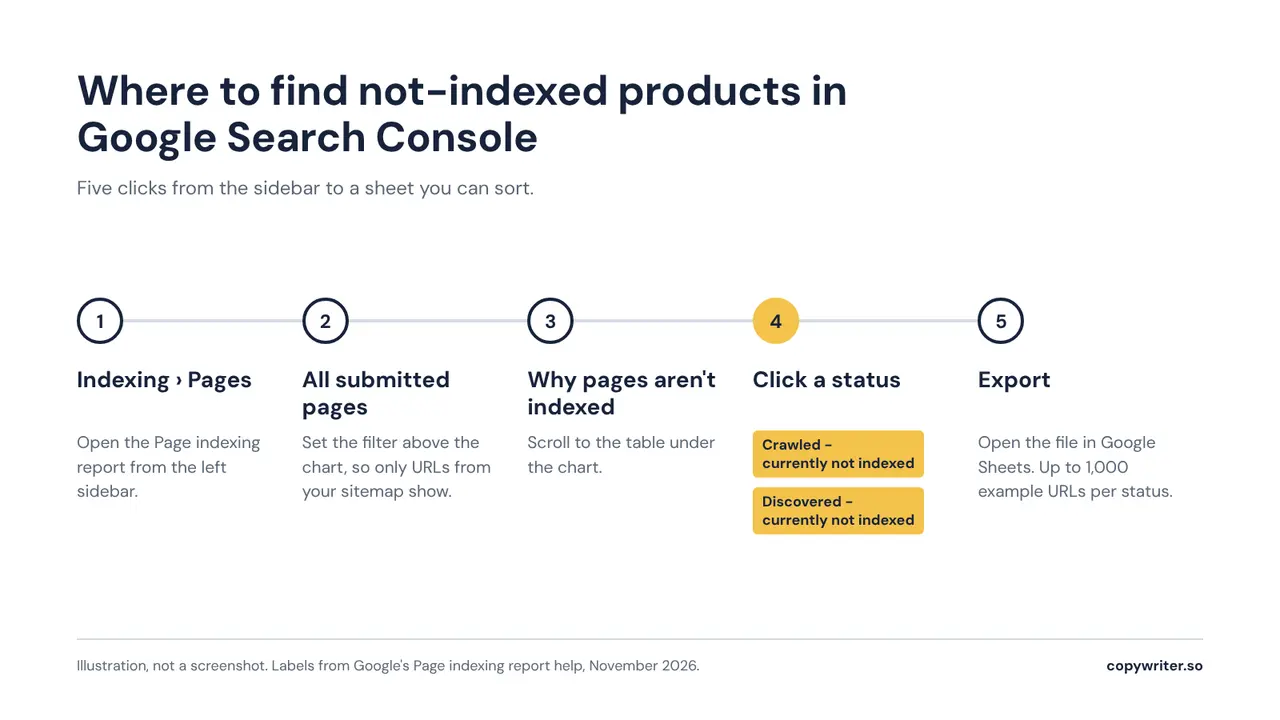
- In Search Console, open Indexing › Pages and set the filter above the chart to All submitted pages. That limits the report to URLs in your sitemap, which should list every product you want found.
- Under Why pages aren't indexed, click Crawled - currently not indexed, use the export button and open the file in Google Sheets. Repeat for Discovered - currently not indexed.
- Know the limit: each examples table shows at most 1,000 URLs and may not list every affected one. On a big catalog, it's a sample.
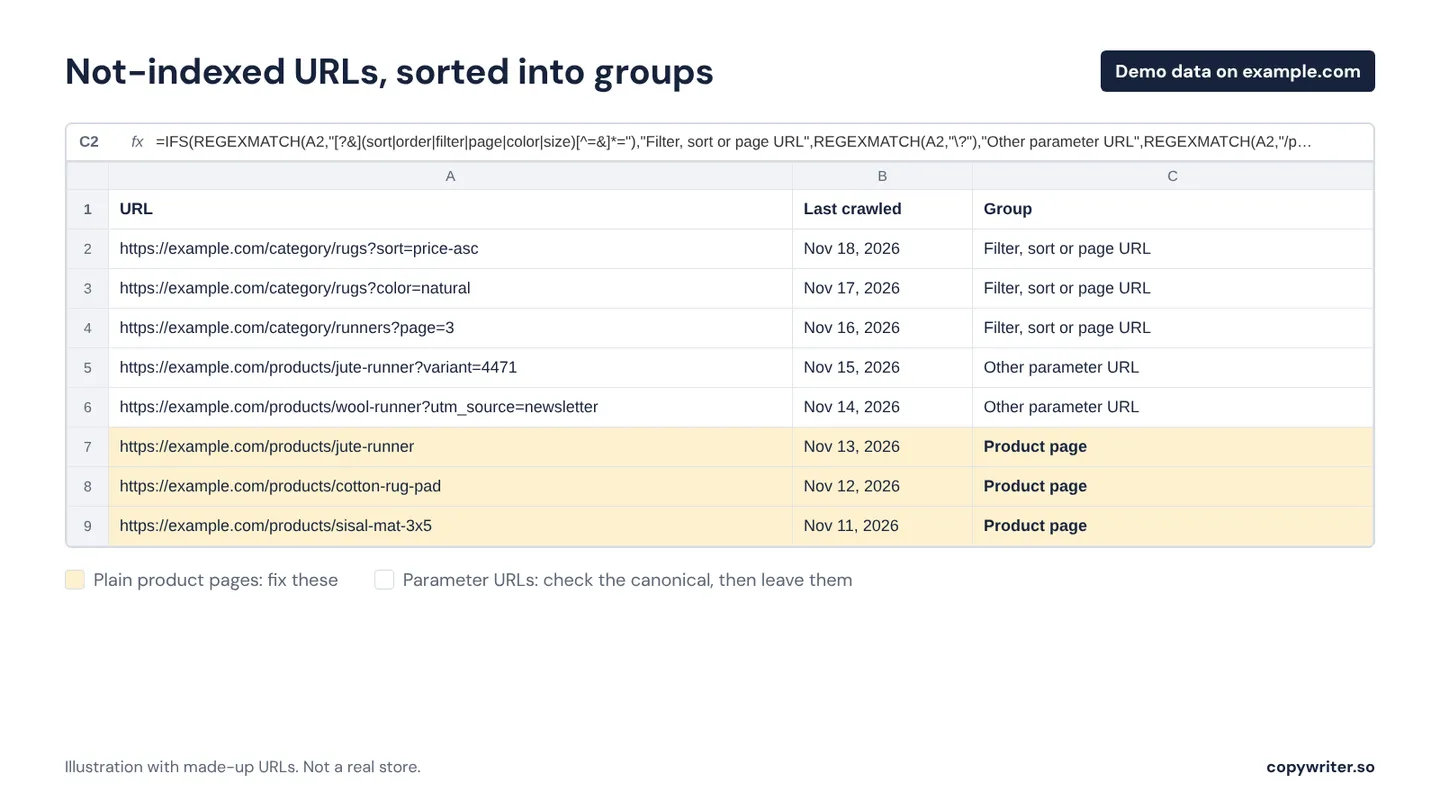
With the URLs in column A, paste this in C2 and fill it down. If your product URLs don't contain /product/ or /products/, change that part to your platform's product path.
=IFS(REGEXMATCH(A2,"[?&](sort|order|filter|page|color|size)[^=&]*="),"Filter, sort or page URL",REGEXMATCH(A2,"\?"),"Other parameter URL",REGEXMATCH(A2,"/products?/"),"Product page",TRUE,"Other page")
Here's what it returns on a demo store (example URLs, not a client's):
| URL (demo store) | Group | What to do |
|---|---|---|
| /category/rugs?sort=price-asc | Filter, sort or page URL | Leave it |
| /category/rugs?color=natural | Filter, sort or page URL | Leave it |
| /products/jute-runner?variant=4471 | Other parameter URL | Check its canonical, then leave it |
| /products/jute-runner | Product page | Fix it (below) |
Which not-indexed URLs can you ignore?
Most parameter URLs. Google says pages that show the same products sorted, filtered or reached another way probably shouldn't be indexed, and that a page labelled duplicate or alternate usually means Google found and indexed the main version. Check each carries a canonical tag pointing to the main page. Some platforms also create a second copy of each product URL inside a category path; the same rule applies. Run one example from each group through the URL Inspection tool to confirm the Google-selected canonical.
How to fix crawled - currently not indexed on product pages
Google doesn't say why it skipped a page, so start here:
- Look for copied text. Search Google for one sentence of the description in quotes. If supplier or competitor pages show the same words, your page adds little. For pages Google treats as duplicates, its advice is to make the content differ substantially.
- Rewrite best sellers first. Add what only you know: measurements you took, what it pairs with, who it suits, care details. Thousands of products won't change in a week; your top 100 can.
- Link them. Each product should sit in at least one category that's in your menu. Google says that, starting from your homepage, it should be able to index every other page on your site if your navigation is complete.
- Recheck. Request indexing for a few key URLs in URL Inspection, then watch the report over the following weeks.
How to fix discovered - currently not indexed
Here Google hasn't visited yet, so content isn't the first lever. Google's crawl budget guide calls the inventory of URLs it knows the factor you can control most. Link products by their main URL everywhere, so Google has one URL per product to crawl. For sorted or filtered versions you can't consolidate, the guide suggests blocking them in robots.txt.
Then switch the filter back to All known pages and open the URL marked 'noindex' row. If real products are there, a setting in your platform, theme or SEO plugin is hiding them. Remove the noindex from any product you want indexed.
Not sure where your store stands? Our Shopify SEO audit crawls the whole site and checks indexing, for a fixed price.
Sources
- Page indexing report, Search Console Help, checked November 2026
- Crawl Budget Management, Google Crawling Infrastructure docs, checked November 2026
Want this done for your catalog?
Book a call and tell us about your store.