How to Get Your Products Listed and Recommended on ChatGPT
The three ways to get your products listed on ChatGPT, what OpenAI says decides which products it recommends, and what to fix first on a large catalog.
- Written by
- Profitonium team
- Published
- Reading time
- 4 min
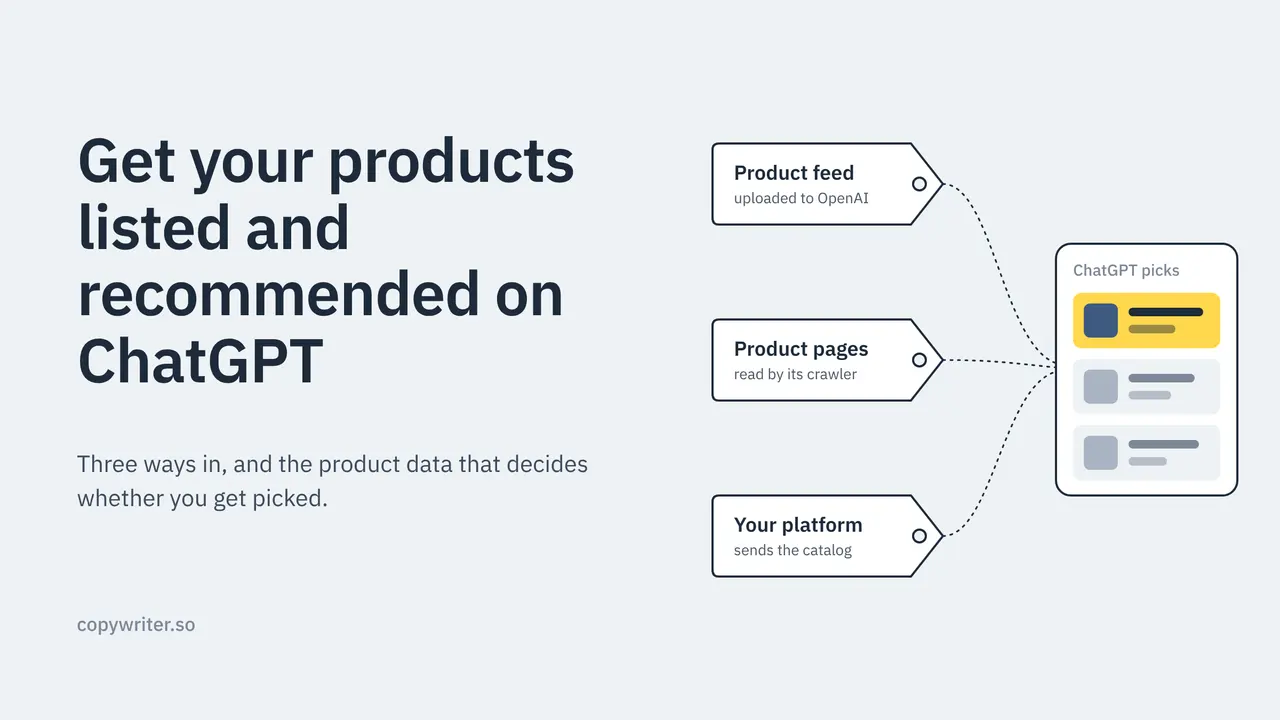
There are three ways to get your products listed on ChatGPT: submit a product feed to OpenAI, let OpenAI's search crawler read your product pages, or sell on a platform that sends your catalog for you. Getting recommended is the harder part, and it mostly comes down to how complete and specific your product data is.
Nobody can guarantee a spot in ChatGPT's answers. Here's what OpenAI says decides the picks, and what to fix first.
How do I get my products listed on ChatGPT?
OpenAI says ChatGPT can use product feeds and other retail and public web sources to find products. That gives you three routes, and they work together:
| Route | Who it suits | What to do |
|---|---|---|
| Product feed | Stores selling to US shoppers | Upload a feed in ChatGPT's Business Hub (steps below) |
| Your product pages | Every store | Don't block OAI-SearchBot in robots.txt. OpenAI says sites that opt out won't be shown in ChatGPT search answers |
| Your platform's integration | Stores on platforms that connect to ChatGPT | Check what your platform offers. Shopify stores, for example, are already connected through Shopify Catalog, with no extra work |
To submit a ChatGPT product feed, OpenAI's feed guide lists these steps:
- Claim your business in ChatGPT's Business Hub, if you haven't already.
- Verify your identity in the hub's product section.
- Choose the countries and currencies you sell in.
- Prepare the feed to OpenAI's product feed schema, keeping each product's ID stable.
- Deliver it by manual upload, a hosted URL or SFTP, then fix any errors the upload reports.
Standard feed uploads currently target US shoppers; OpenAI adds other markets only after it confirms your integration.
What decides whether ChatGPT recommends your product?
Being listed only gets you considered: OpenAI says not all available products will necessarily be shown.
OpenAI lists what ChatGPT considers when it picks products:
- Structured product data, such as price and description
- The shopper's own context, such as their budget or what they've said they dislike
- For the list of sellers: availability, price, quality, and whether you're the maker or primary seller
It may also show a summary of reviews from public websites.
The first item is the one you control most. When a shopper asks for "a light waterproof jacket that packs small, under $120", ChatGPT can only match facts your product data actually states.
The same product, two levels of detail (demo)
This is a demo product we made up to show the difference. We haven't measured how ChatGPT ranks either version. The table shows which parts of that shopper's question each version gives ChatGPT facts for.
| Field | Before (demo) | After (demo) |
|---|---|---|
| Title | Blue Jacket | Women's Packable Waterproof Rain Jacket, Navy |
| Description | Stylish jacket. Great quality, perfect for any occasion. | Waterproof shell with taped seams. Packs into its own chest pocket. Weighs 280 g in size M. Not insulated, so it's for rain, not snow. |
| Category | Not set | Set to the matching jacket category |
| Price | $98 | $98 |
| Facts that match the question | "jacket" and the price | jacket, waterproof, packs small, light (280 g), and the price |
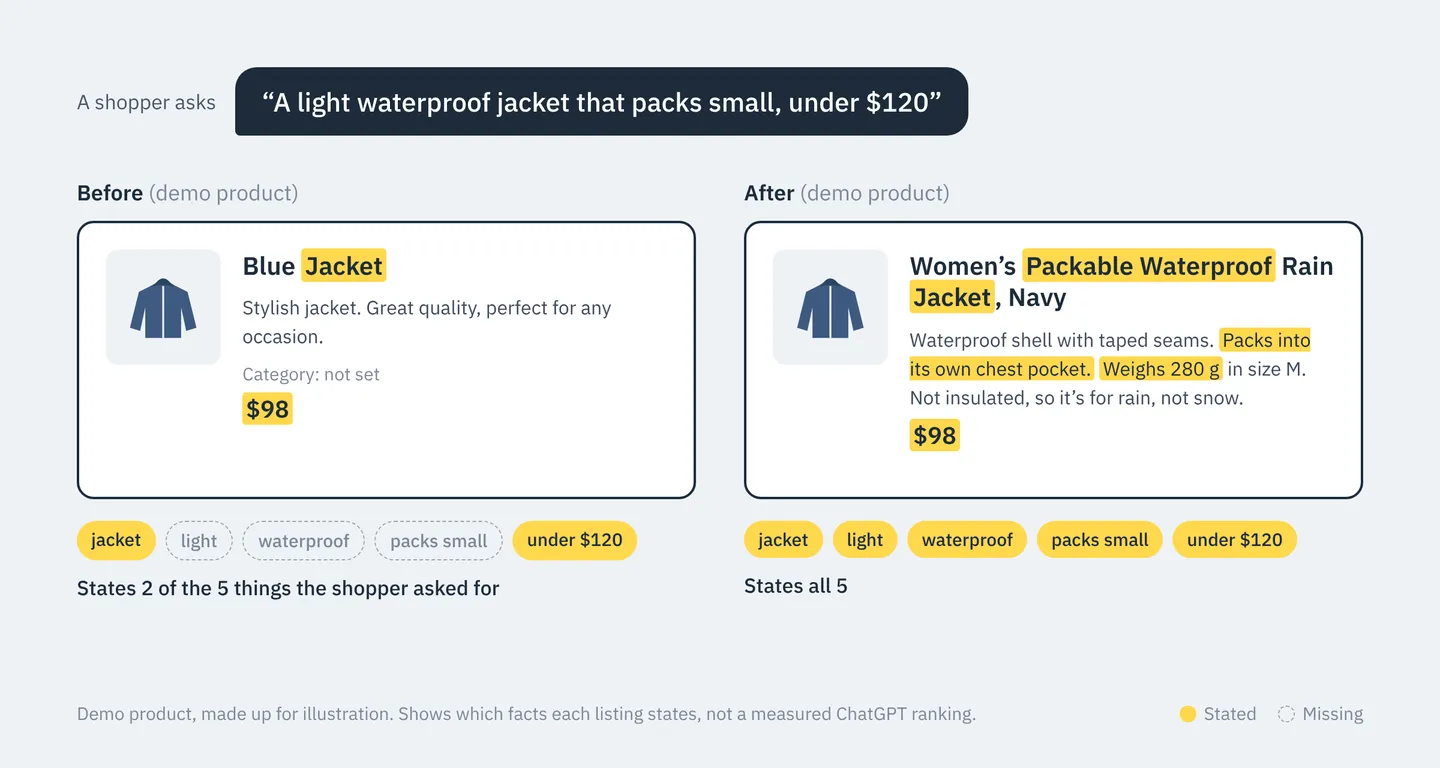
Both versions cost the same and describe the same jacket. Only one tells ChatGPT it's waterproof and packable.
How to optimize for ChatGPT shopping on a large catalog
Shopify's advice for Shopify Catalog, the route its stores take into ChatGPT, works as a checklist on any platform: give accurate, detailed and descriptive titles, descriptions, images, categories, variants, options, prices and inventory. On a catalog of thousands of products, work in this order:
- Start with your best sellers. They carry the most revenue, so fixing them first pays back soonest.
- Rewrite titles as product type plus the attributes people search by: material, fit, size, use.
- Put buying facts in descriptions: specs, sizes, what it's for and what it isn't for. Cut adjectives that state no fact.
- Fill in category, variants and options, so each size and color is a clear choice.
- Keep price and stock accurate. OpenAI ranks sellers partly on availability and price, and says price changes can take a while to show.
- Work in batches. Group products by type or collection and apply one set of rules to each group with your platform's bulk editor or a CSV export, instead of editing one product at a time.
Can you pay to get your products recommended by ChatGPT?
Not for the regular product results. OpenAI says product results are not ads and that ads are kept separate from them. OpenAI's feed schema also has a separate field for ad-eligible products, independent of search eligibility. Outside ads, product data is your main lever.
Not sure where your store stands? Our Shopify SEO audit checks a sample of your product data and asks ChatGPT and other AI assistants three questions your buyers ask, for a fixed price.
Sources
- Submit product feeds, OpenAI Commerce docs, checked November 2026
- Product feed schema, OpenAI Commerce docs, checked November 2026
- Overview of OpenAI Crawlers, OpenAI API docs, checked November 2026
- Shopping with ChatGPT Search, OpenAI Help Center, checked November 2026
- Shopify Catalog, Shopify Help Center, checked November 2026
Want this done for your catalog?
Book a call and tell us about your store.